The ultimate workspace for all your matter work.
Keep a client's documents, chats and brief together, and let Tracker follow its cases in court. Every answer cites the matter's own documents, with the page.
Your whole case file, one question away. Every document, every date, every chat on the matter, read in full and cited to the page.
Where the matter stands
A brief, a timeline, the places your documents disagree and the hearings, built from the file and the court's own site.
- A matter: brief1
The brief
A short summary with its dates in bold, then the parties, forum and stage, the key issues, the key dates and your positions and instructions.
- A matter: suggested from chats2
Suggested from chats
When a chat turns up something new, add it to the brief, rewrite it to fit, or leave it. Nothing goes in without you.
- A matter: timeline3
The timeline
Every dated event in the documents, in order, each with the file and the page it came from. Events with no date are kept under Undated.
- A matter: conflicts4
Conflicts
Facts your documents state differently, such as a delivery date or a claim amount that changed between the notice and the plaint. Open each at the page and decide which you rely on.
- A matter: hearings5
Hearings
The matter's cases from the court's own site: the next listing with its court and item, connected cases on a case map, and past listings with their orders.
Review tables
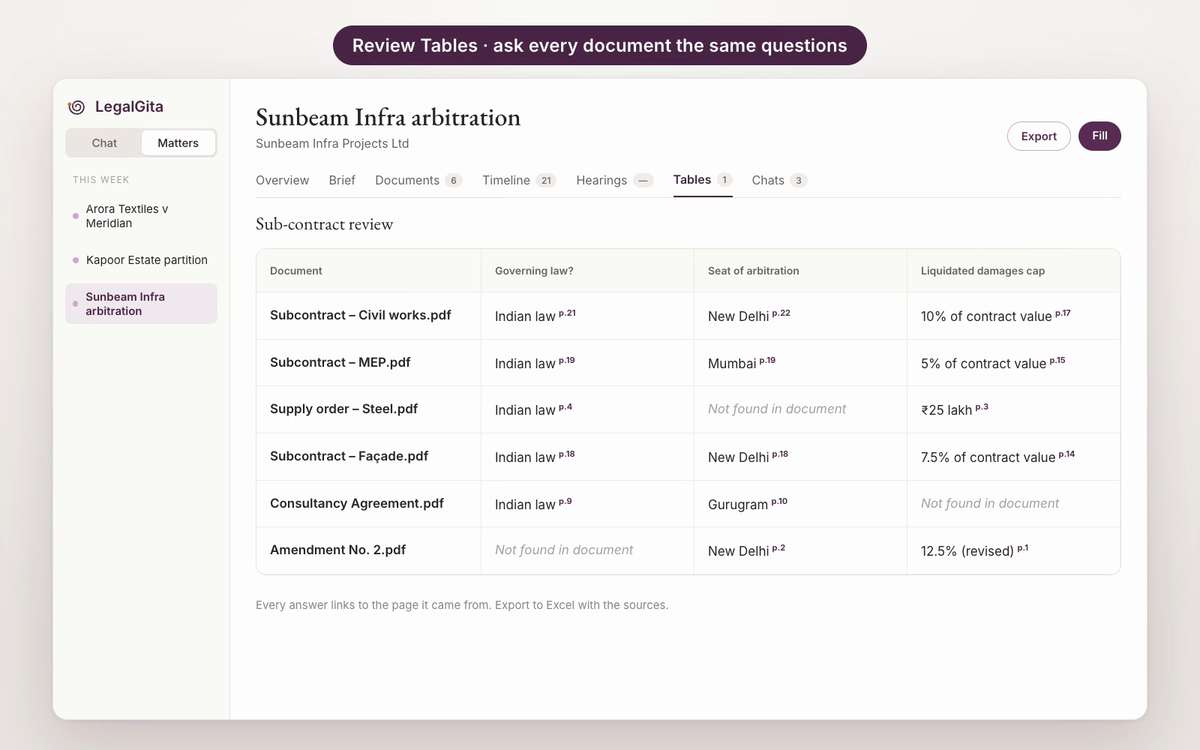
Ask the same questions of every document and get the answers as a grid.
- 1
A column for each question
Governing law, seat of arbitration, liquidated damages cap: as free text, Yes / No, a choice or an amount.
- 2
Every cell sourced
Each answer comes with its page. Where a document is silent, the cell says Not found in document.
- 3
To Excel
Export the table with the source of each answer. Mark rows reviewed as you check them, or ask about the whole table.
Work on it together
Bring colleagues into the matter. Everyone works from the same documents, brief and chats, and can pick up where someone else left off.
- Working on a matter together1
Add a colleague
Click Collaborate and add someone from your firm by name or email. They see the matter's documents, brief and chats. The owner can hand the matter over, or remove someone who no longer works on it.
- Working on a matter together2
Everyone's chats, or just yours
The Chats tab shows who started each chat in the matter. Switch between Everyone and Mine, and see when a chat was continued from a colleague's.
- Working on a matter together3
Pick up a colleague's chat
A colleague's chat opens read-only. Reply to it and it continues as your own chat, with their answer and the matter's documents carried over. Theirs stays as it was.
Keep exploring.
Ask a legal question. Specialists research it in parallel and return one cited answer.
Learn more ›Courts' daily orders, read for how each bench actually rules.
Learn more ›Store, search and share case files. Scans in Indian scripts are read in full.
Learn more ›Your Delhi High Court and Supreme Court cases, checked twice a day, with a reminder before every listing.
Learn more ›